RSS
 

Author Archive

Facebook f8 Conference Live Stream

22 Sep


We are excited to watch the Facebook developers conference live stream. Last night we started experiencing programmers pain since they’ve rolled out some changes prior to updating the documentation. The Hand Things Down app which is launching this weekend has broken so we are anxiously awaiting updates to the documentation. We are hoping to stay on our release schedule and will likely have to work night and day to hit our deadlines. Hurry up Zuck!

Enhanced by Zemanta
 
No Comments

Posted in Startup


Journey to Extreme Pitch

31 Aug

I recorded this video after coming home from Extreme Pitch. I wanted to give advice on what to do to calm yourself before a pitch. I think I managed to say don’t drink too much coffee and go to yoga, that advice probably won’t work for most people. Sorry guys! Read the rest of this entry »

 
No Comments

Posted in Startup


I Think, Therefore I Tweet #twitterjunkie

15 Jul

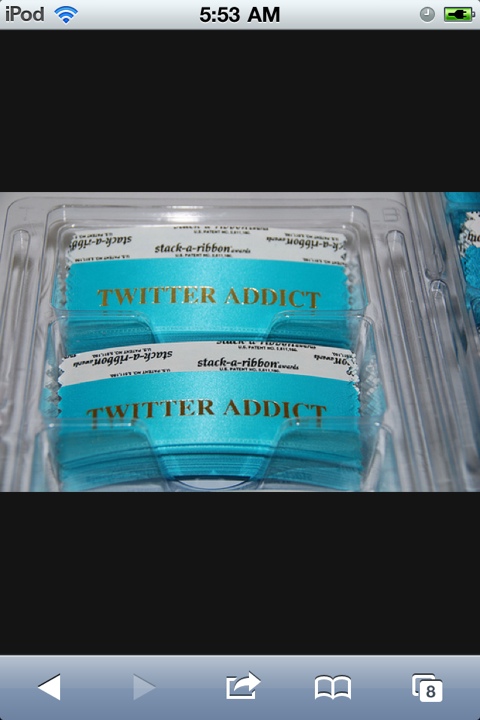
I am addicted to Twitter. There, I said it, admitting it is the first step, right? Over the last year, posting to Facebook has diminished, especially as I became more and more fascinated by Twitter. The biggest attraction is real-time news whether it’s what’s trending locally, articles about technology or startups, or conversations about my favorite topics. I love reading and consuming what’s going on, even if I do most of my reading late at night and into the wee hours of the morning.

I love sharing information and the conversations around various hashtags opens my mind to different ideas. During the work day, I limit information consumption so I can power through my to do list and have productive meetings. Yet the minute I get a free moment I’m compelled to check the feed to see what’s going on. Does anyone else feel this way? Hidden obsessive-compulsive tendencies?

It’s ok, if you don’t follow me. I tweet up to a hundred times a day which can be overwhelming to a casual user or anyone new to Twitter.

This is what I post:

  • Content from startup or social media events.
  • Content I’m reading, using Twitter to “bookmark” since it’s automagically backed up on Backupify.
  • Conversations on the following hashtags: #startup, #leanstartup, #smcphx, #socialmedia, #UFC, #phxlatenite
  • Random thoughts throughout the day.
  • Checkins on Gowalla/Foursquare/Facebook/Google+

Here are the mobile Twitter apps I use for iPhone:

    • Echofon – my favorite for browsing the feed and having twitter conversations.
    • Smartr – to read articles tweeted by people I follow without the noise of the conversations.

Hootsuite – to schedule articles and shorten links.

  • Tweetdeck – to post tweets longer than 140 chars, it’s laggy on my device so I use it very rarely.
  • Twitter – I use this the least and can’t figure out why I haven’t deleted it.

What are your favorite Twitter apps? Who else is addicted to Twitter?

20110715-055338.jpg
Image credit: Steve Rhodes


Harder to Lose Klout When You Actually Engage

14 Jul

When you’re involved in social media, engagement is everything. Do you ever wonder what would happen if you suddenly stopped posting? This is the question I wanted to answer with the experiment on “How to Trash Your Klout Score“. Business owners believe social media needs near constant engagement, one of the questions I wanted to answer was what is the bare minimum you need to do so you can run your business or even go on vacation while still providing your customers a great online experience. I will post those guidelines after the experiment ends on July 17.

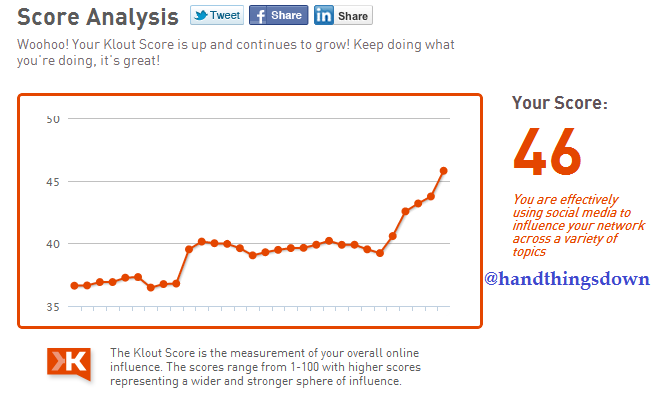
Seven days into the experiment, my Klout score is holding steady at 52 points. I had to tweet for an hour on July 8th for the Social Media Club Twitter Chat on the topic of Finding Balance for your Professional and Personal Life Online. If you look at each data point in the graph my score was going up incrementally for a couple days after this event. Since I stopped tweeting on my account it had a negative impact on Merlin U Ward’s (@MerlinUWard) brand, resulting in a 6% drop in reach for him. You can read the details and additional metrics on Merlin’s blog.

When I started the experiment on my Klout score, I never thought it would impact anyone else. Merlin bet my Klout score would drop 5 points, my goal was to drop 7 points. For people or businesses who only push out content or talk AT people, disconnecting may not have noticeable impact on anyone else’s reach. I believe Merlin’s reach dropped since we use Twitter as if it was instant messaging and texting to discuss my favorite topics, technology and business or fun things like #futzing and #wordswithfriends. I post a lot of articles on startups and entrepreneurship which ties into the conversations we are having publicly, you can think of it as tweet radio.

Klout score steady at 52 points after 7 days of inactivity.

The interesting side effect of this experiment is how the Klout score for my business account has gone UP. I’ve been tweeting out of the Hand Things Down Twitter account (@handthingsdown) and using it to have conversations I would normally have on my personal account. The other night, there was an informal Twitter chat about when the next #Twilight movie “Breaking Dawn” would be premiering. The Twilight series is near and dear to most moms which is the group I normally socialize with on this account. Since using @handthingsdown to have more conversations, the Klout score went up nearly 4 points in a week!

The lesson from the last few days; your Klout score will go up dramatically just by talking to people and BEING SOCIAL, it is after all social media. It’s not an exotic animal to be gawked at from the outside, it’s more like happy hour where you get to know people and discuss topics you are passionate about.

Enhanced by Zemanta
 
1 Comment

Posted in Marketing


How to Trash Your Klout Score

07 Jul

I’ve been following a social experiment with great interest over the last couple of weeks. Merlin U Ward challenged himself to become influential over #futzing in Klout in 10 days. He chose a word that wouldn’t be used in normal conversation for his “scientific” experiment. At first, I ignored using the #futzing hashtag on Twitter, hoping it would go away because I didn’t know what it meant. I also had no desire to accidentally have #futzing attached to my name. When I realized I can hide word in Klout I decided to join in on the fun, as a by product my own Klout score raised 4 points over 30 days, even going up 1 point in the last 5 days.

I thought this was interesting since social media junkies are all slightly obsessed with raising Klout. I’ve never been one to follow the pack so why not do the exact opposite for 10 days?

In an effort to see the results of influence within Twitter, I disconnected my Facebook account which resulted in an immediate 2 point drop in Klout. Then I disconnected Linkedin to receive a 4 point drop in Klout to 52 points.

10 Day Plan

  • Last tweets before going silent is to moderate the Social Media Club Phoenix Chat on how to separate your professional and personal life online on July 8 from 2:00 – 3:00 pm using the hashtag #smcphxchat
  • Respond to @mentions on DM to reduce the number of tweets from my account to nearly zero over the next 10 days. This will be hard since I’ve recently switched to using Twitter to replace instant messaging and text messaging. Most of my conversations are public, I have no secrets.
  • Don’t post any content I’m reading to Twitter, post directly to Linkedin.

Report back in 5 days with a screenshot showing the Klout score at that time.

If you want to follow this experiment, don’t forget to sign up to get it delivered to your mailbox or RSS reader. You can also follow on Twitter @CherylMarquez.


Klout score after disconnecting Facebook and before disconnecting Linkedin.

Cheryl Marquez's Klout is 56 on July 7

Klout score after disconnecting LinkedIn.

Cheryl Marquez's Klout score is 52 after disconnecting Facebook & Linkedin on July 7.

Note: This entire post was written on my iPod Touch in Evernote, then pasted into the WordPress app. This is why the screenshots of Klout are from an iOS device instead of the web.

 
3 Comments

Posted in Marketing


Startup Weekend Chandler Day 1

25 Jun
Image representing Startup Weekend as depicted...

Image via CrunchBase

Normal people look forward to the weekend to relax and hangout with their friends. Entrepreneurs, go to Startup Weekend and decide to get involved in another exciting project. Friday morning, I woke up, got ready, and packed my purse with everything I would need to work for the day. My gear included; netbook, power charger, phone, iPod, extended battery, headphones, mouse, notebook, pens, makeup, extra t-shirt with geek logo, webcam, mouse, and USB hub. Yes, I did pack all of that in my very stylish black patent leather purse that I had to use because they matched my shoes.

I stopped by Gangplank to drop off the stuff for the Women 2.0 Founder Friday happy hour. Hand Things Down was hosting this networking event for the ladies attending Startup Weekend. Then drove to the Chandler Public Library to attend Startup 101. Startup 101 was a chance to get a primer before the weekend for anyone new to the world of being an entrepreneur. They had panels talking about creating a team, product development, and execution.

I thought the best talk was about building teams and resolving conflict given by Derek Neighbors and Jade Meskill. Here are some of their key points.

  • Create a team with a common vision.
  • Look at the vision and use that to help guide decisions and conflict resolution.
  • Read “Core Protocols” to learn about conflict resolution.
  • Ask people at the beginning about their level of commitment.
  • You should NOT compromise, negotiate for the best of each idea.
  • Teams of developers and business people should sit together to discuss direction as the weekend progresses.

As the evening kicked off, the ladies of Startup Weekend got together for Founder Friday happy hour to get to know each other before we joined the guys. There was some good discussion and an exchange of Twitter handles so we could follow each other during and after the weekend.

When Startup Weekend kicked off, we heard about 28 pitches and then the mayhem of self-forming teams commenced. Two teams stood out for me. One of them was Chow Locally who is creating a locavore website to connect local farmers with consumers and delivering the farm fresh veggies and fruit to the Phoenix Public Market.  The second team I was interested in was called Surpriz.es and this is the team I joined for the weekend. Surprizes collects birthday freebies and presents them to you on your special day with Facebook and Twitter greetings. Now you can feel the birthday love all day as you go out and collect your freebies.

So that wraps it up for Day 1. Tomorrow I will be writing up birthday related blog posts for Surprizes and greeting people for their birthdays on Twitter. Sign up for your birthday Surpriz.es.

Enhanced by Zemanta
 
No Comments

Posted in Startup


Why We Switched to Facebook Comments

20 Jun

90% of visitors to online communities are lurkersEvery couple of weeks we participate in a Founder Institute master class to continue discussions and keep forward momentum for our startup. The subject for the last call was user acquisition. We went over the various tactics on how to drive engagement through social media channels like Facebook fan pages, Twitter, Quora, Youtube, and commenting on blogs related to our business. Each startup participates in a different mix of social outlets, it really depends on where the customers for your company hangout, a business to business (B2B) company may not require a YouTube or Facebook presence. B2B startups may spend more time on Linkedin discussions or Quora answering questions and establishing themselves as subject matter experts in an area related to their product offering.

Driving Awareness on Facebook

After the call, it was clear we needed to switch from using the Disqus commenting system to Facebook comments. Migration will be easy since we are fairly new and we haven’t received many comments using Disqus. While no one wants to be dependent on Facebook for all of the social aspects of their web properties, this is a case where it made sense for us to move to Facebook comments. Moms with toddlers who are on Facebook are our launch target and we want to make sure every comment made on the Hand Things Down blog shows up on their walls to further drive engagement with our brand.

Where does your customer hangout online?

On Wednesday night, I was at a Social Media Planning Meeting and Jeff Moriarity said one of the pros for using Disqus is conversation around your brand from all over the web is aggregated in one place. Here are some questions your startup will need to consider; Where does your customer hangout? What do they read? What videos do they watch? Are they more likely to use Facebook or Twitter? You also need to keep in mind that if your target customer is only on Facebook, perhaps Facebook commenting will help them move from being a lurker to an engaged member of your community.

Your company can listen for conversations around the web using a different tool. We are using Google Alerts to listen for any mentions of our brand and actively retweet or push original content on Twitter and our Facebook fan page.

Enhanced by Zemanta


Getting Press for Your Startup

02 Jun

Getting your startup in the newsWhen we were in the Founder Institute at the beginning of the year, we had weekly milestones for customer development, market research, competitive analysis or product development to keep our business moving forward. The biggest aspiration we had at the time was to graduate. We worked our butts off to polish the pitch deck and get the 0.1 version of the Hand Things Down mobile app done during our last three-week sprint.

We naively thought, once we graduate we can get back to a normal life. Then as you hit each milestone, you take a breath, maybe catch up on a little sleep and start charging towards the next goal. Startups usually go into beta, then start scrambling to get press for their big launch. We were very lucky to receive our first mention in a Mashable article by Jolie O’Dell on the “5 Ambitious Social Good Startups Created in a Single Weekend” while we were busy with the private beta for Hand Things Down.

Before you begin tackling the tactics below to make a splash with your web startup, make sure you create a compelling story to make people want to share what your company’s story with their friends. Then give them a product they can’t live without so they keep telling their friends about it.

Top 7 things you need to do to launch a web startup, according to Robert Scoble on Quora:

  1. Get a LaunchRock site or create a landing page from WordPress using the LaunchPad theme to collect email addresses.
  2. Make a blog.
  3. Make a YouTube video channel.
  4. Start Tweeting.
  5. Get a Facebook Page.
  6. List your company on Angel List (and StartupLi.st, CrunchBase, etc).
  7. Figure out the 10 journalists you want to have seen your product before you launch.
  8. Be lucky…added by me

If you are creating your startup team, the ideal combination is to have one person focused on business and marketing while the other founder focuses on development. My primary focus has been on creating content for the blog, writing guest blog posts on websites that our target customer regularly visits and of course social media. Social media includes tweeting regularly on the company Twitter account, posting questions and content on the Facebook page and commenting on Facebook pages our target customer might read AS THE BUSINESS FACEBOOK PAGE. Do all of these marketing activities even before your company releases the product to build your online brand. Social media marketing takes a long time to gain traction. If you don’t have time to create your blog, create a landing page where you can collect email addresses of interested customers that you can market to when you start your beta.

I added number 8 because luck will play a part in how hard or easy it will be to get your company in the news. Since we participated in Startup Weekend, Founder Institute – Seattle, and continue to be active in the startup community, we are sometimes listed on their websites under the Hand Things Down brand. Being listed in the Startup Weekend company directory got us included in the social good article on Mashable.

Lastly, guest blog and begin developing relationships with 10 journalists you would like to feature your company before you need press and establish yourself and your company as a thought leader in your space.

Image credit: Chlorine-lim

Enhanced by Zemanta


Product Management from the iPhone or iPad

04 May

Product development is a challenge for distributed teams. Keeping the developers in sync with the product guys is like trying to catch butterflies, the ever expanding features and compressed deadlines makes everyone a little crazed. Sometimes product managers don’t know how long it would take to develop a feature or fix a bug. If the developers could mark complexity in a project management tool it would be useful in helping the product guy make tradeoff decisions. What do you do if you are using Agile development and you don’t have a physical location track every two week sprint?

PivotalTracker to Manage Features
We started using PivotalTracker to track features, bugs, and business requirements. We have projects for iOS, Android, the web app, and the business to make sure things don’t fall through the cracks. We can asynchronously add things to do, estimate complexity and move it into the current week when work is started. Features or bugs which exceed velocity are automatically added to the backlog.

Trackerbot to access Pivotal Tracker on the iPhone or iPad

What is most compelling about PivotalTracker is the ability to access it from the iPhone or iPad using the Trackerbot app. The screenshot is our iOS project showing a couple bugs and features which are on the board this week. Personally, having access to the project or product tools on the go is important since entrepreneurs are almost always thinking of the business even in social situations. I like being able to add a bug to the system when I discover them during demos with our launch customers. Sometimes, I’m out at a baseball game and I get an idea on how a feature would work, I could just launch the TrackerBot app and add it. At our next development meeting, we could take a look at the features in the “icebox” to see if any of them could be moved up.

The other cool feature is being able to track how much time is spent on a particular item. This will help going forward when we need to estimate how many developers we would need for future projects.

Integrations

  • Email – When something is assigned to me, I can reply via email and the reply is filed as a comment with the feature or bug. No more searching through email when I’m working on something because it’s all in one spot.
  • GetSatisfaction – to get feedback from users
  • Jira
  • Zendesk, etc.

Our team experimented with using Gqueues to track features because the premium version integrated with gmail and google calendar. That didn’t turn out to be the right solution since we were trying to force-fit a nested to do list into a collaborative project management tool.

To read more about our paper and pen method of Agile product development, check out Bill’s post.

What is your team using for project management and product development? Post them in the comments.

NOTE: We are not associated with PivotalTracker or GQueues, we thought we could share our experience and learn from others what tools work best for you.

 
No Comments

Posted in Startup


Blogging Regularly For Non-Writers

23 Apr

Writing with a blank slateHave you seen the infographic saying you should be blogging at least three days a week to keep people coming back to your site? When I saw this, I thought, “how could I ever come up with that much content, I’m not even a writer!” I’m going to share how I’m managing this internal perception by creating habits to help me “feel” like a writer.

The biggest challenge when you’re getting started or when you step into a role where blogging becomes part of your responsibility is making time to write. I get the best inspiration for blog posts as I’m driving, in the shower, or running. None of these situations make it easy for me to jot down my thoughts. Yet If I put a system in place to get these thoughts together the writing process would go so much smoother.

The other big challenge is I don’t think of myself as a writer. I tried video blogging as a replacement, as soon as I would turn on the webcam, every coherent thought seemed to leave my mind. I was able to post a couple of quick videos and the biggest challenge in video blogging from a public location was feeling awkward talking to myself. It’s sort of the reason why I hate those Bluetooth thingies and insist on speakerphone instead.

To overcome these challenges and to push myself to BE UNCOMFORTABLE, which is where growth happens, I’ve put together a couple tips for non-writers who blog.

Tips for Non-Writers Who Blog

  1. Schedule 30 – 60 minutes to blog everyday.
    You don’t need to post everyday. Scheduling the time with the goal of creating a daily habit to write will improve your writing skills.
  2. Write uninterrupted during your scheduled time.
    This sounds so obvious, why even point it out, right? The goal is to focus on writing, no email, no texting, and no instant messaging. If you’re like me, you might have electronic ADHD, jumping from IM to email to text, research that link or stat, tweet something, post to Facebook fan page and after an hour your blog post has nothing written in it. So when you’re writing, all distractions need to be turned off or muted.
  3. Put placeholders for statistics, links, or resources in your blog post.
    Remember the goal is to write for an uninterrupted 30 – 60 minutes. Once you’re writing time is done, you can go back and look for those resources to include in your post.
  4. Release your blog posts according to your schedule.
    You can proofread your posts and send it out to your formal and informal editors, the most important thing is to release according to your schedule. We all want perfect writing and besides getting those typos fixed, you just have to let it go. Know you will get better over time AND you can always update the post to fix errors.

Resources

Here are a couple apps I use to blog on the go.

  • Evernote
    I love Evernote when I’m driving because I can record a voice note on the go, then when I get to the computer I can type it up. I like that Evernote will sync to my computer or to the web without sync cables.
  • Dragon Dictate by Nuance
    One of the lawyers I’ve met in Seattle uses Dragon Dictate to dictate his blog posts. The app will turn your voice notes into text you can email to yourself. He would email the converted text, edit it on the computer, and post to his blog. I found I wasn’t successful at using Dragon Dictate because it needs an Internet connection to convert from voice to text and my Mifi card wasn’t getting a strong enough signal in my area.
  • WordPress app
    Our business blogs are self-hosted WordPress on our domain, once I complete a draft in Evernote, I can copy it all into the WordPress app for posting. I could write the draft directly in the app but it doesn’t have the ability to save voice notes, at least not that I’m aware.
  • Blogwriter Lite
    My personal blog is hosted on Blogger and I was hesitating to move it to WordPress because the app was preventing me from logging into one of the business blogs. Now that issue is fixed so I’m debating if I want to move to WordPress or host my personal blog on Tumblr for ease of use.

Do you have tips to get from beginning blogger to experienced? What are your favorite blogging tools on the go? Put them in the comments.

Note: I wrote and edited this entire post in Evernote on the iPod, then copied into the WordPress app to publish.

Image credit: http://m.flickr.com/#/photos/kristiand/3223920178/

 
2 Comments

Posted in Marketing